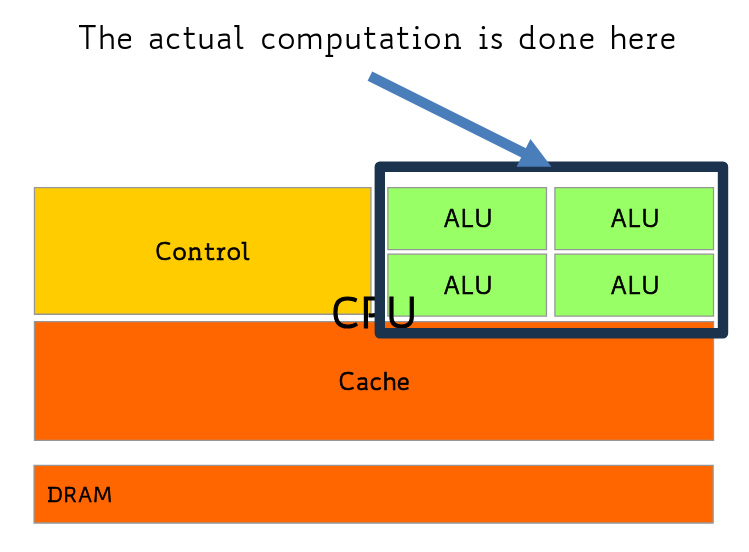
CPUs are latency-oriented (latency = time taken to complete a single task).
They aim for high clock frequency, and feature:
large caches, to convert long latency memory to short latency cache accesses
sophisticated control mechanisms to reduce latency (like branch prediction, out-of-order execution etc)
powerful ALUs (which carry out the actual computation) (each ALU is considered a core)
architecture
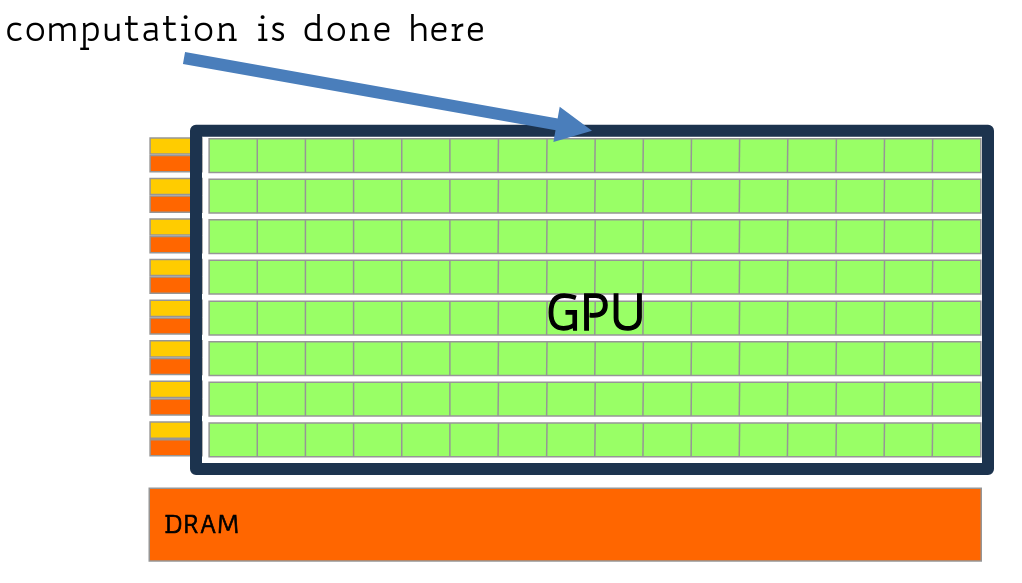
GPUS are throughput-oriented (throughput = amount of work done for unit of time). They feature:
moderate clock frequency
small caches
simple control (no branch prediction, execution is done in order)
control units are very small, which means there are a lot more of them
32-thread blocks (called warps) share one controlling unit (they all execute the same assembly instruction)
high bandwith memory (way higher than that used by CPU and DRAM)
CPU works on DRAM, GPUs have their own memory
needs to be higher because many more cores are trying to access it - the latency in memory access is masked by the high amount of cores present
architecture
CUDA-capable GPUs
features:
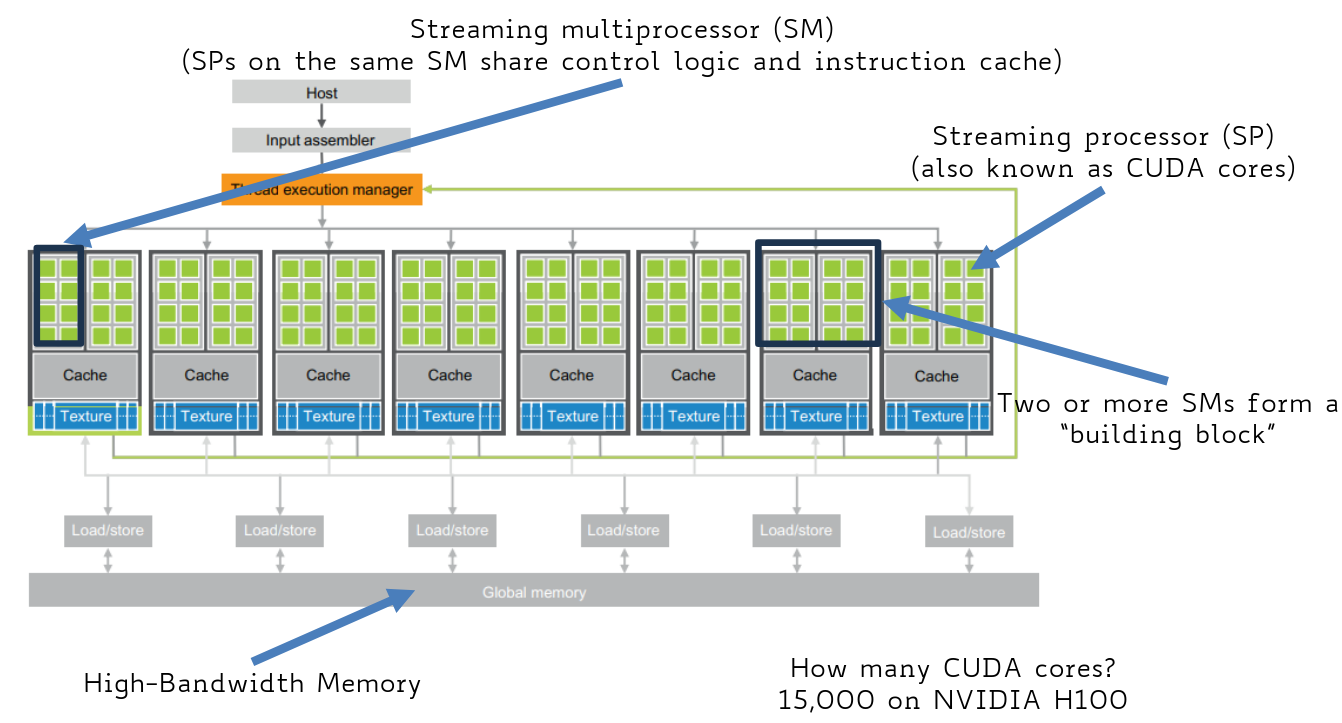
CUDA cores (streaming processors) ⟶ ALU-like components, optimised for parallel code execution
streaming multiprocessors ⟶ CUDA cores on the same SM share control logic and instruction cache
CPU vs GPU applications
So, in summary:
CPUs are oriented towards sequential parts where latency matters (CPUS can be 10+x faster than GPUS for sequential code)
GPUs are oriented towards parallel parts where throughput matters (GPUs can be 10+x faster than CPUs for parallel code)
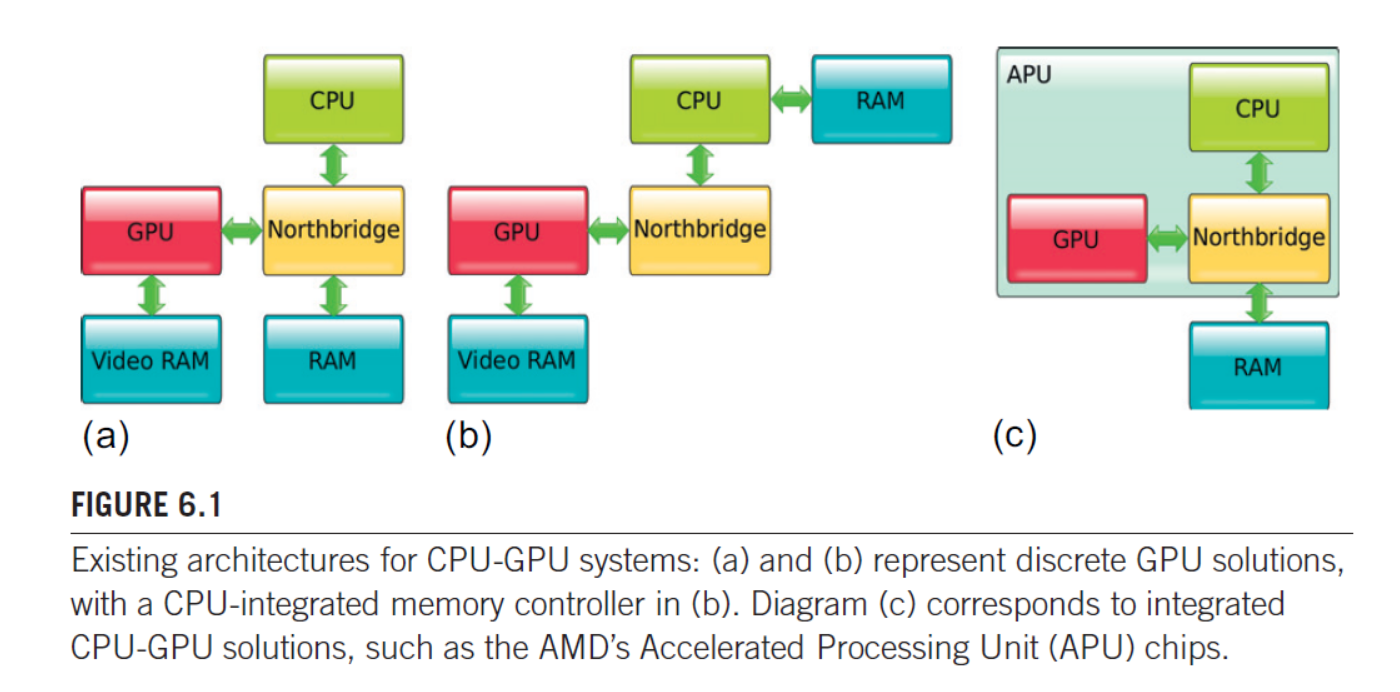
CPU-GPU architecture
There are many ways to link GPUs to CPUs
(a) older architecture where GPU, CPU and RAM are all connected to the northbridge
the GPU is connected to the northbridge via a high-speed link like PCIe (express)
the data transfer between CPU and GPU (or RAM and VRAM) must pass through the northbridge, adding latency and extra steps
(b): a common architectured used today, the memory controller (that handles RAM communication) is removed from the northbridge and placed on the CPU itself
(c): architecture of the modern integrated systems, CPU an GPU cores are combined onto a single chip package, often called an APU
the CPU and GPU are physically integrated, and share the same system RAM. this eliminates the need to copy data between separate VRAM and RAM
the communication between CPU and GPU is extremely fast
(grz diego)
GPU software development platforms
the main GPU software delopment platforms are:
CUDA ⟶ provides 2 sets of APIs (high-level and low-level). only for NVIDIA hardware (however there are tools to run CUDA code on AMD GPUs)
HIP ⟶ AMD’s equivalend of CUDA. most calls are the same, with only the first 4 characters changing (CUDA-command ⟶ HIP-command)
there are tools to convert CUDA code to HIP
OpenCL (open computing language) ⟶ open standard for writing programs that can execute across a variety of heterogeneous platforms that include GPUs, CPUs, DSPs or other processors.
supported by both NVIDIA and AMD (primary development platform for AMD GPUs)
OpenACC ⟶ open standard for an API that allows the use of compiler directives to automatically map computations to GPUs or multicore chips
and more
CUDA: Compute Unified Device Architecture
CUDA enables a general-purpose programming model on NVIDIA GPUs
it was initially created for 3d graphics, then adapted to the general public
It enables explicit GPU memory management
The GPU is viewed as a compute device that:
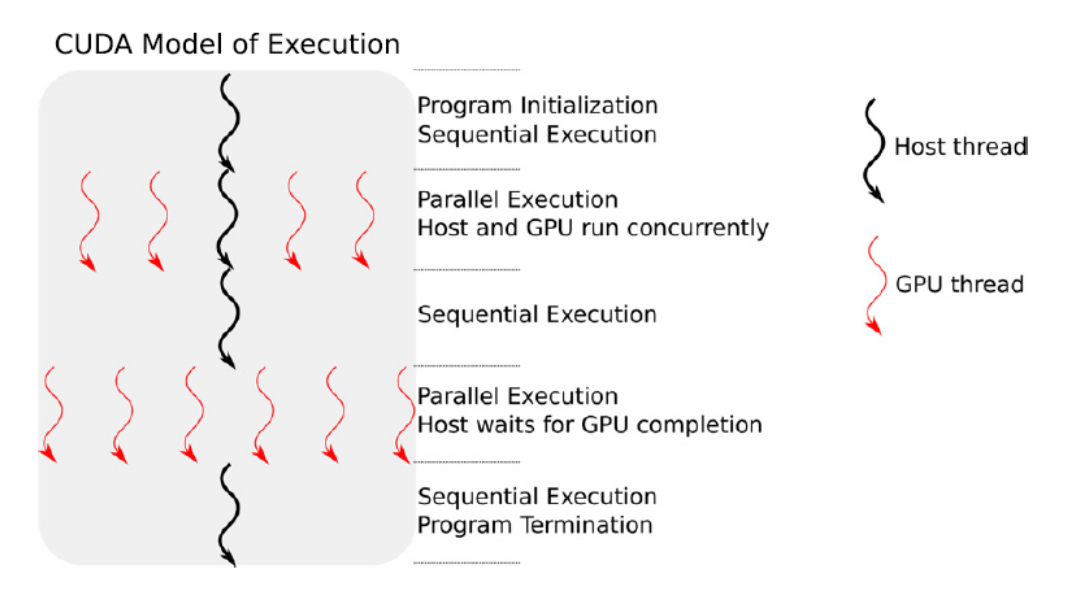
is a co-processor to the CPU
has its own DRAM (“global memory”)
runs many threads in parallel
CUDA program structure
Allocate GPU memory
Transfer data from host to GPU memory
Run CUDA kernel (functions executed on the GPU)
(when the kernel is done) Copy results from GPU memory to host memory
Execution model
In the vast majority of scenarios, the host is responsible for I/O operations, passing the input and subsequently collecting the output data from the memory space of the GPU
thread organisation
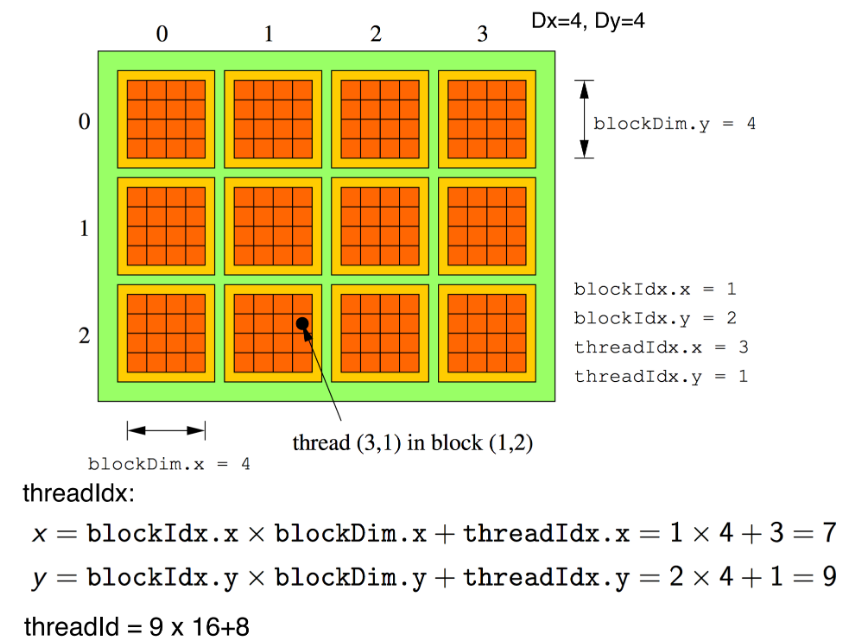
CUDA organizes the threads in a 6-D structure (maximum - lower dimentions are also possible)
threads can be organized in 1D, 2D or 3D blocks
blocks are organized in 1D, 2D or 3D grids
Thread position
(possible oral exam question !)
Each thread is aware of its position in the structure via a set of intrinsic variables (with which it can map its position to the subset of data that it is assigned to):
blockDim ⟶ contains the size of each block (Bx,By,Bz)
gridDim ⟶ contains the size of the grid, in blocks (Gx,Gy,Gz)
threadIdx ⟶ contains the (x,y,z) position of the thread within a block, with:
x∈[0,Bx−1]
y∈[0,By−1]
z∈[0,Bz−1]
blockIdx ⟶ contains the (bx,by,bz) position of a thread’s block within the grid, with:
bx∈[0,Gx−1]
by∈[0,Gy−1]
bz∈[0,Bz−1]
getting thread position in the grid/block
(linear view:
)
unique thread identifier
different threads might have the same threadIdx but be on different blocks, so i need to combine threadIdx and blockIdx to get a unique identifier
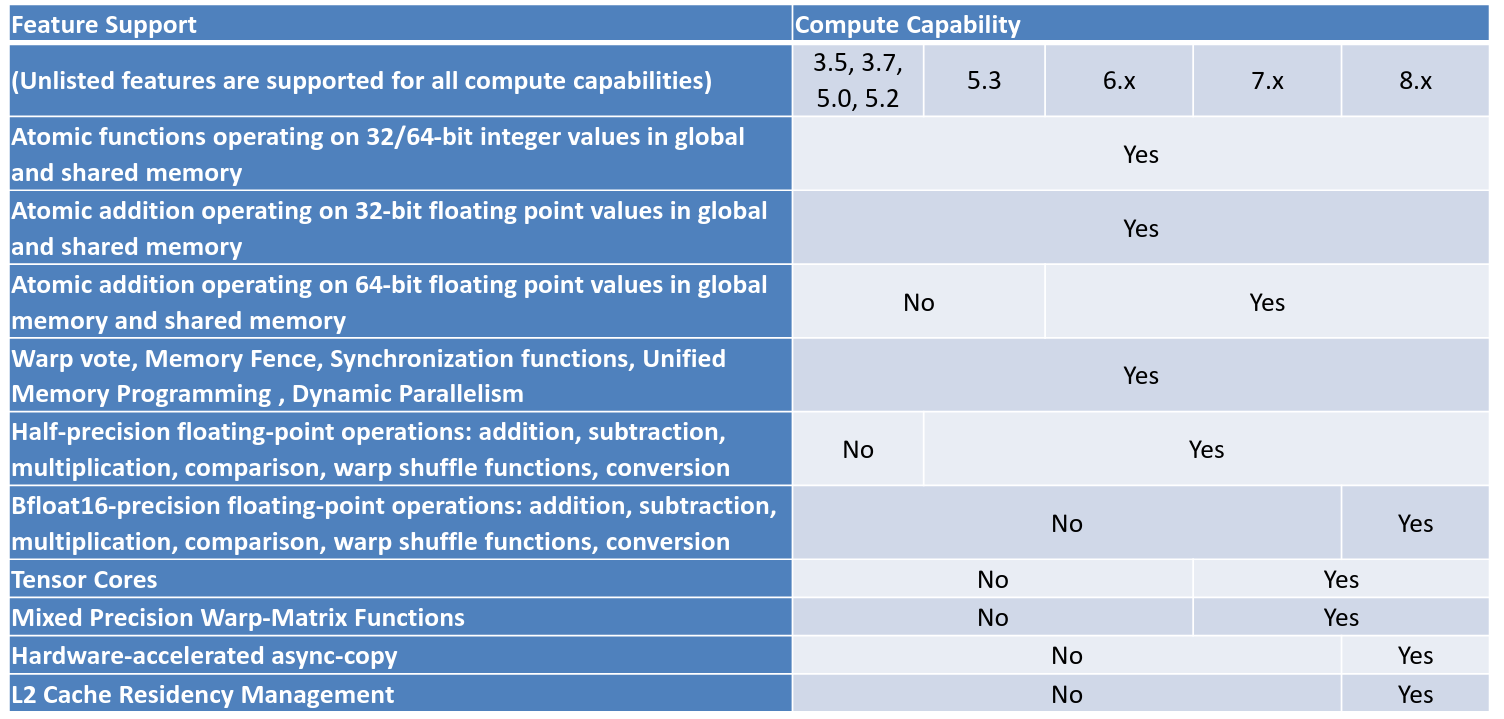
Sizes of blocks and grids are determined by the capability (what each generation of GPUs is capable of).
the compute capability of a device is represented by a version number (“SM version”), which identifies the features supported and is used by applications at runtime to determine which hardware features/instructions are available
CUDA compute capabilities
Programs in CUDA
CUDA is usually SPMD (or SIMT, Single Instruction, Multiple Threads).
To use parallel computing with CUDA, one must specify:
a function (called kernel) that is going to be executed by all the threads
all kernels have a void return type ⟶ to get a result, we have to move the data from the GPU to the CPU
kernel calls are asynchronous: they give the control back to the host (so cudaDevicesSynchronize(); is necessary to ensure synchronization)
how threads are arranged in the blocks and how the blocks are arranged in the grid
hello world in cuda
// hello.cu#include <stdio.h>#include <cuda.h>//kernel__global__ void hello() { // printf is supported by CC 2.0 printf("Hello world!\n");}int main() { hello<<<1,10>>>(); // blocks until the CUDA kernel terminates (barrier) cudaDeviceSyncronize(); return 1;}
CUDA files use the .cu extension. It’s the same as .c, but it serves as a convention as .cu files are expected to be run on GPUs.
Function decorators
__global__ ⟶ (kernel definition) a function that can be called by host or GPU, but will be executed on the GPU
the compiler generates assembly code for the GPU instead of for the CPU, as they have different instruction sets, and a different compiler (nvcc))
__device__ ⟶ a function that runs on the GPU and can be only called from within a kernel (i.e. from the GPU)
__host__ ⟶ a function that can only run on the host.
typically omitted, unless in combination with __device__ to indicate that the function can run on both the host and the device. (such a scenario implies the generation of two compiled codes for the function !)
Thread scheduling
Each thread runs on a CUDA core. Sets of cores on the same SM share the same Control Unit, so they must synchronously execute the same instruction.
different sets of SMs can run different kernels
Each block runs on a single SM (i.e. i can’t have a block spanning over multiple SMs, but i can have more blocks running on the same SM)
not all the threads in a block run concurrently.
Once a block is fully executed, the SM will run the next one.
Warps
Threads are executed in groups called warps (currently made of 32 threads - warpSize variable).
threads in a block are split into warps according to their intra-block ID (eg. the first 32, then the next 32 etc)
all threads in a warp are executed according to the SIMD model (one single instruction for all threads in the warp) - so, all the threads in a warp will always have the same execution timing
several warp schedulers can be present on any Streaming Multiprocessor
Warp divergence
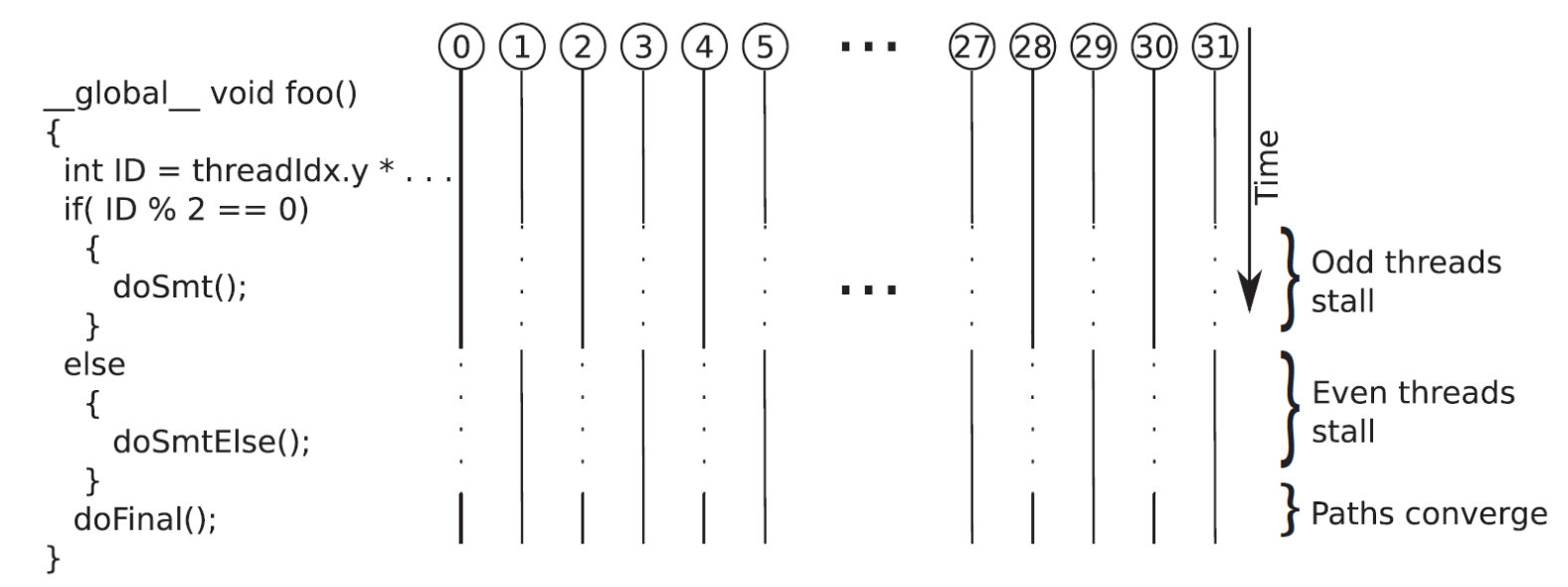
Since all threads in a warp are executed according to the SIMD model, at any instant in time, for all the threads in the warp, one istruction is fetched and executed.
If a conditional operation leads the threads to different paths, all the divergent paths are evaluated sequentially until the paths mege again.
threads that do not follow the path currently being executed are stalled
divergence
Context switching
Usually, a SM has more resident blocks/warps than it is able to currently run. To be able to execute all of them, each SM can switch seamlessly between them.
each thread has its own on-chip private execution context, so context-switching comes almost for free
When an instruction that a warp needs to execute has to wait for the result of a previously initiated long-latency operation, the warp is not selected for execution ⟶ instead, another resident warp that isn’t waiting gets selected. This mechanism is called “latency tolerance” or “latency hiding”.
given a sufficient number of warps, the hardware will likely find one to execute at any point in time
This ability to tolerate long-latency operations is the main reason GPUs don't dedicate nearly as much chip area to cache memories and branch prediction mechanisms as CPUs
Instead of context switching, the biggest cost in GPU parallel computing is data transfer (GPU/CPU)
Block size esample 1
Suppose a CUDA device allows up to 8 blocks and 1024 threads per SM, and 512 threads per block.
should we use 8x8, 16x16, or 32x32 blocks ?
8x8 blocks ⟶ 64 threads per block would make it necessary to have 16 blocks to fill a SM. However, we can have at most 8 blocks per SM, ending up with 512 threads per SM. The resources wouldn’t be fully utilized.
16x16 blocks ⟶ 256 threads per block would make it necessary to have 4 blocks to fill a SM. That would allow us to have 1024 threads for each SM (so, many opportunity for latency hiding)
32x32 blocks ⟶ we would have 1024 threads per block, which is higher than the 512 threads per block we can have
Block size example 2 (3)
Suppose our structure is a grid of 4x5x3 blocks, each made of 100 threads, and that the GPU has 16SMs.
to distribute 4x5x3=60 blocks over 16SMs, we can use round robin ⟶ that way, 12SMs would receive 4 blocks, and 6SMs would receive 3 blocks.
this is an inefficient solution, as while the first 12 SMs will be processing the last block, the other 6 will be idle
A block contains 100 threads, which are divided into 3 full warps (3 x 32 = 96 threads) and a final “partial” warp of 4 threads.
Assuming 32 CUDA cores per SM, when the 4-thread partial warp is executed, only 4 of the 32 cores are active.
This leaves 28 cores idle for the duration of that warp’s execution (87.5% of the cores are unused), resulting in poor hardware utilization.
Conclusion: Block size (100 threads) is not a multiple of the warp size (32), which leads to significant thread/core underutilization.
Device properties
device properties struct
struct cudaDeviceProp { char name[256]; // A string identifying the device int major; // Compute capability major number int minor; // Compute capability minor number int maxGridSize [3]; int maxThreadsDim [3]; int maxThreadsPerBlock; int maxThreadsPerMultiProcessor; int multiProcessorCount; int regsPerBlock; // Number of registers per block size_t sharedMemPerBlock; size_t totalGlobalMem; int warpSize; // . . . and more};
listing all the GPUs in a system
int deviceCount = 0;cudaGetDeviceCount(&deviceCount);if(deviceCount == 0) printf("No CUDA compatible GPU exists.\n");else{ cudaDeviceProp pr; for(int i = 0; i < deviceCount; i++) { cudaGetDeviceProperties(&pr, i); printf("Dev #%i is %s\n", i, pr.name); }}
Memory access
Data allocated on host memory is not visible from the GPU and viceversa. It must be explicitly copied from host to GPU (and viceversa).
memory operations
the following calls are made from the host
memory allocation:
// allocate memory on the devicecudaError_t cudaMalloc ( void** devPtr, size_t size);
devPtr ⟶ pointer address for the hosts’s memory, where the address of the allocated device memory will be stored
size ⟶ size in bytes of the requested memory block
freeing memory:
// frees memory on the devicecudaError_t cudaFree ( void* devPtr);
devPtr ⟶ host pointer address modified by cudaMalloc()
copying data:
// copies data between host and devicecudaError_t cudaMemcpy ( void* dst, const void* src, size_t count, cudaMemcpyKind kind);
dst ⟶ destination block address
src ⟶ source block address
count ⟶ size in bytes
kind ⟶ direction of the copy - cudaMemcpy is an enumerated type which can take one of the following values:
cudaMemcpyHostToHost(0): Host to Host
cudaMemcpyHostToDevice(1): Host to Device
cudaMemcpyDeviceToHost(2): Device to Host
cudaMemcpyDeviceToDevice(3): Device to Device, used in multi-GPU configurations (only works if the two devices are on the same server system)
cudaMemcpyDefault (4): used when Unified Virtual Address space is available
errors:
cudaError_t is an enumerated type; if a CUDA function returns anything other than cudaSuccess (0), an error has occurred
Example: vector addition
(got it from diego 4 now thx diego need 2 come back to this TODO)
vector addition
//h_ specifies it is memory on the host void vecAdd(float* h_A, float* h_B, float* h_C, int n){ int size = n * sizeof(float); // d_ specifies it is memory on the device float *d_A, *d_B, *d_C; cudaMalloc((void**) &d_A, size); cudaMemcpy(d_A, h_A, size, cudaMemcpyHostToDevice); cudaMalloc((void**) &d_B, size); cudaMemcpy(d_B, h_B, size, cudaMemcpyHostToDevice); cudaMalloc((void**) &d_C, size); vecAddKernel<<ceil(n/256.0), 256>>(d_A, d_B, d_C, n); cudaMemcpy(h_C, d_C, size, cudaMemcpyDeviceToHost); cudaFree(d_A); cudaFree(d_B); cudaFree(d_C);}
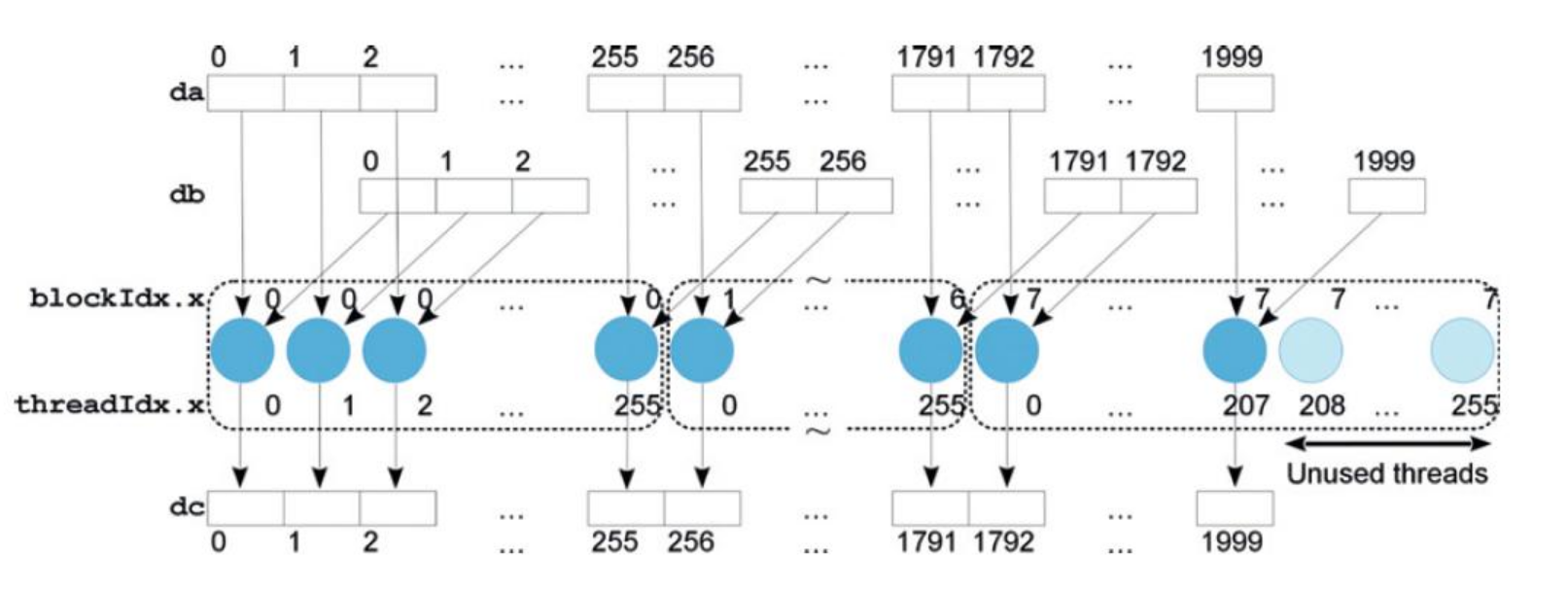
in this case, we might be running ceil(n/256) blocks. if n is not a multiple of 256, could run more threads than number of elements in the vector.
each thread must then check if it needs to process some element or not
__global__void vecAddKernel(float* A, float* B, float* C, int n){ int i = blockDim.x * blockIdx.x + threadIdx.x; // check if thread is supposed to do something if (i < n) C[i] = A[i] + B[i];}
error cheching (good practice)
we should check the cudaError_t return variable to handle any errors
int deviceCount = 0;cudaGetDeviceCount(&deviceCount);if(deviceCount == 0) printf("No CUDA compatible GPU exists.\n");else{ cudaDeviceProp pr; for(int i=0; i<deviceCount; i++) { cudaGetDeviceProperties(&pr, i); printf("Dev #%i is %s\n", i, pr.name); }}int deviceCount = 0;cudaGetDeviceCount(&deviceCount);
Memory types
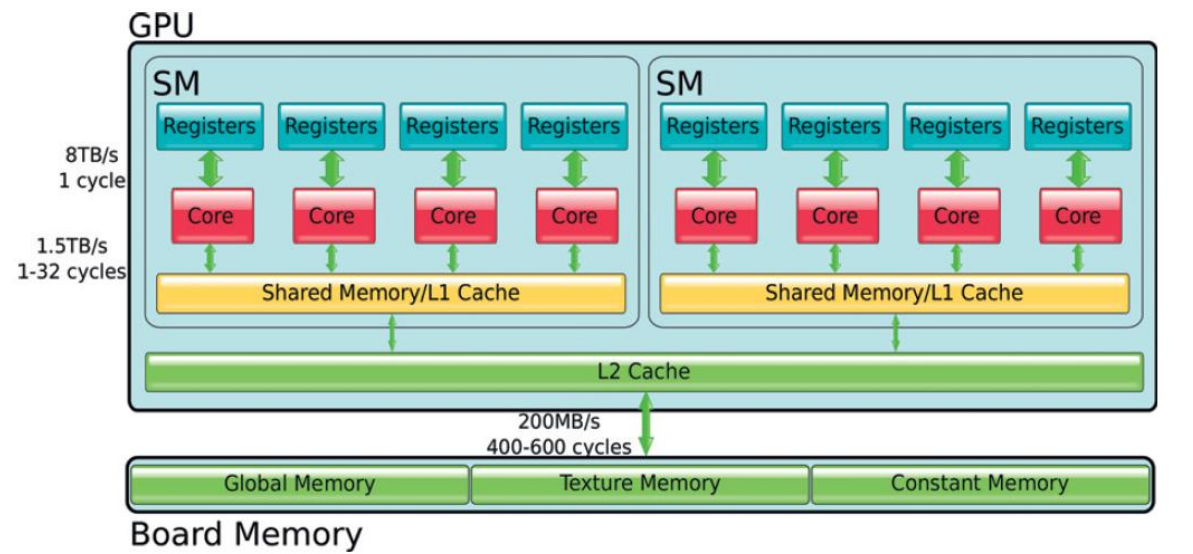
Memory is divided into on-chip and off-chip.
Memory Types
registers ⟶ hold local variables, are unique to each SP.
shared memory ⟶ fast on-chip memory that holds frequenty used data.
can also be used to exchange data between SPs of the same SM
L1/L2 cache ⟶ (act as seen in the comparch course) transparent to the programmer
global memory ⟶ main part of the off-chip memory.
high capacity but relatively slow, it is the only part accessible through CUDA functions
texture and surface memory ⟶ content managed by special hardware that permits fast implementation of some filtering/interpolation operator
constant memory ⟶ part of the memory that can only store constants.
it is cached, allows for broadcasting of a single value to all threads in a warp
CUDA variables scopes and lifetime:
variable declaration
memory
scope
lifetime
automatic variables other than arrays
register
thread
kernel
automatic array variables
global
thread
kernel
__device__ __shared__ int SharedVar;
shared
block
kernel
__device__ int GlobalVar;
global
grid
application
__device__ __constant__ int ConstVar;
constant
grid
application
Registers
Registers are used to store variables local to a thread
Registers on a core are split among the resident threads
compute capability determines the maximum number of registers that can be used per thread.
if this number is exceeded, local variables are allocated in the global off-chip memory (slow)
spilled variables could also be cached in the L1 on-chip cache
the compiler will decide which variables will be allocated in the registers and which will spill over to global memory
maximum registers and occupancy
nvidia defines as occupancy the ratio of resident warps over the maximum possible resident warps:
occupancy=maximum_warpsresident_warps
example 32.000 registers per SM, and can have up to 1.536 resident threads per SM
a kernel uses 48 registers
a block is 256 threads
each block requires 256⋅48=12.288 registers
thus, each SM could have 2 resident blocks (as 12.288⋅2<32.000<12.288⋅3), and 512 resident threads
512 is much below the maximum limit of the 1.536 threads - this undermines the possiblity to hide latency
an occupancy close to 1 is desirable, as the closer it is the higher the opportunities to swap between threads and hide latencies
the occupancy of a given kernel can be analyzed through a profiler
To increase occupancy, we can:
reduce the number of registers required by the kernel
use a GPU with higher registers per thread limit
Shared memory (on-chip)
Shared memory is on-chip memory that is shared among threads.
(different from registers, that are private to threads)
it can be seen as a user-managed L1 cache.
Shared memory can be used as:
a place to hold frequently used data that would require a global memory access
a way for cores on the same SM to share data
To indicate that some data must go in the shared on-chip memory rather than the global memory, the __shared__ specifier can be used.
shared memory vs L1 cache
Shared Memory (Explicitly Managed)
L1 Cache (Automatically Managed)
Location
On-chip
On-chip
Management
Managed by the programmer (explicitly)
Managed automatically by hardware/OS
Performance Potential
Can provide better performance in some cases
Performance depends on automatic algorithms
Data Guarantee
Programmer has control/guarantee that data needed will be present
No guarantee that the needed data will be in the cache
CUDA organizes the threads in a 6-D structure (maximum - lower dimentions are also possible)
)